
PSCA E Challan check online 2026
Have you received an e-Challan SMS but are confused about whether it is a scam or real? Do not worry. You can quickly verify your challan through psca e Challan check online punjab portal.. You can view the violation details and pay the fine if it is a genuine challan. But how?
In this article, we will completely guide you about e-challan, how to check the challan status and how to pay for it. Keep reading
What is e-challan?
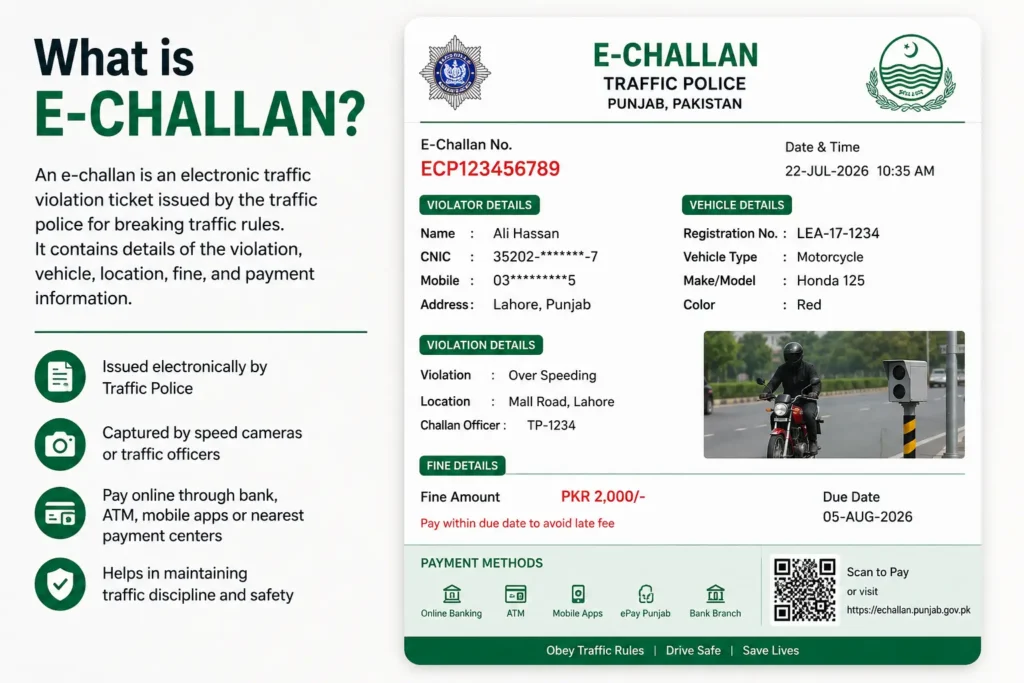
An e-Challan is a digital form of traffic fine issued by the Punjab Safe Cities Authority when a driver violates traffic rules. As you know, safe city cameras are installed everywhere in Punjab. These cameras automatically detect the violation of traffic rules, and generate e-challan with image proof and your vehicle number.
On e-Challan you can find details like the type of violation you did, date and time, location and fine amount.
What is psca e Challan check online portal?
psca e Challan check online portal is challan issuance system, which was introduced by the government of Pakistan. This system issues fines for violations of traffic rules. It is the best digital alternative challan system, which is run through advanced cameras and artificial intelligence systems. No traffic warden or police officer is involved in it. The system is more accurate, efficient, and authentic and allows better monitoring of traffic for safer roads across Punjab. You can check you vehicle smart card status online via this method.
Why does psca issue e-challan?
The Punjab Safe Cities Authority issues an e-Challan to apply the law and ensure road safety. If a safe city sees your car, bike or any other vehicle breaking road rules, they issue a challan on the number of your vehicle with proof. psca e Challan check online system issue an e-Challan for violations such as
- Overspeeding
- Red light violation
- Not wearing a helmet (motorcyclists)
- No seat belt
- Using a mobile phone while driving
- Wrong-way driving
- Illegal parking
- Lane violations
PSCA E-Challan check online Methods
You can check your e challan via the following methods. Here is e challan check karne ka tarika.
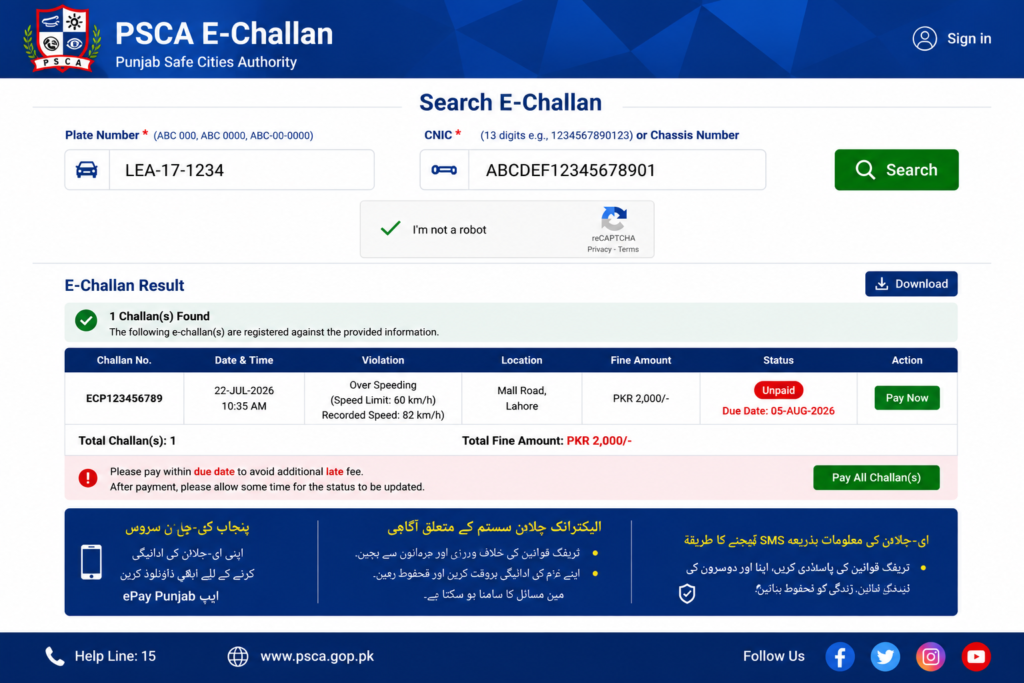
Method 1: Psca e Challan check online by Vehicle Registration Number
This is the easiest way to check pending or paid traffic challans for your car or motorcycle.
Step 1: Open the official PSCA e-Challan portal on your device.
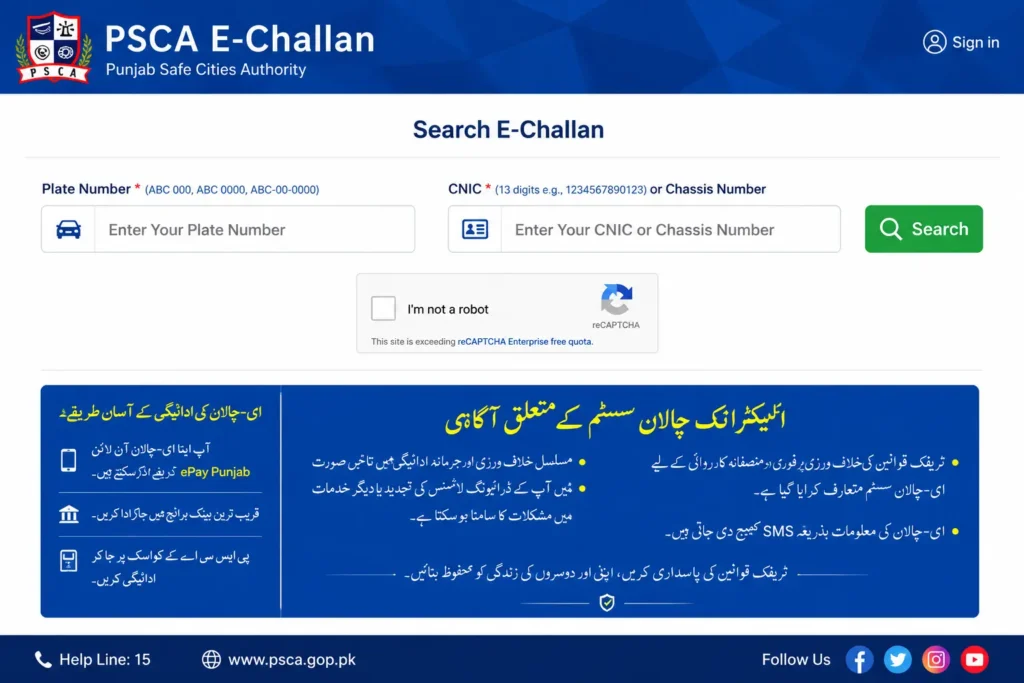
Step 2: Put your vehicle registration punjab number in the box in formats like LEA-1234
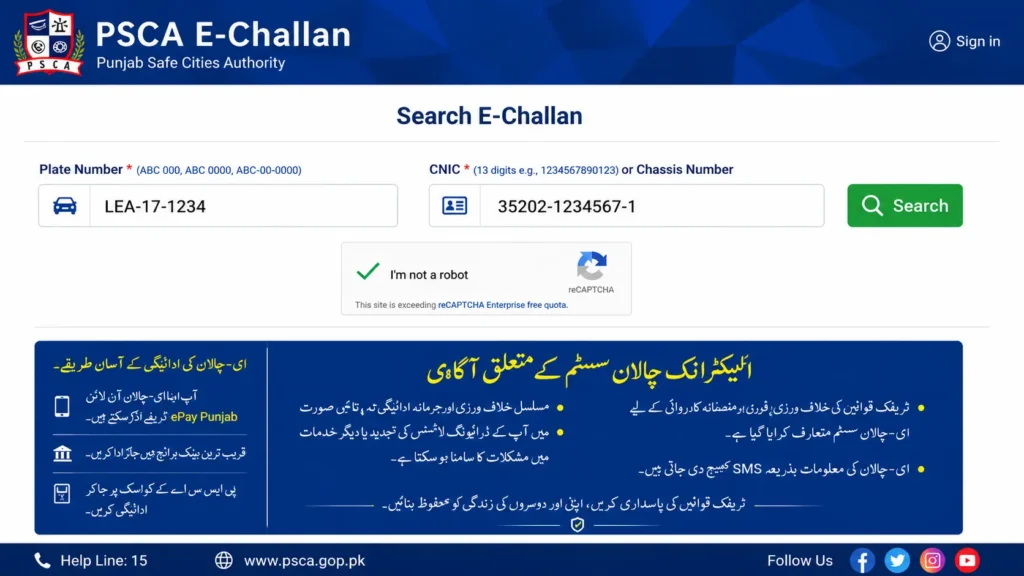
Step 3: Clear the CAPTCHA verification and click on the Search option.
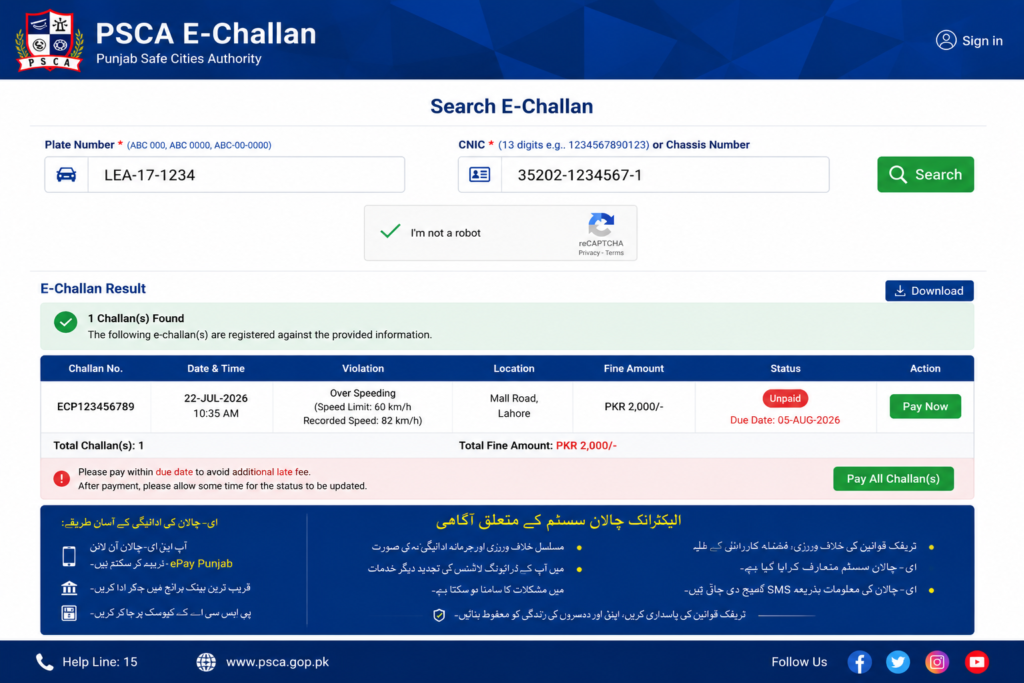
Step 4: Review your challan details such as
- Violation type
- Fine amount
- Date and time
- Camera location
- Payment status
- Evidence photo
Method 2: Check Safe City e-Challan by CNIC
You can check your psca e Challan check online by your CNIC number. This is the most secure way to know the issued vehicle licences linked to your identity card on MTMIS Punjab online Vehicle Verification.
Step 1: Visit the official PSCA e-Challan website on your phone.
Step 2: Tap on the CNIC Search option for checking e-challan.
Step 3: Now enter your CNIC number without dashes.
Step 4: Fill in the CAPTCHA and tap on Search.
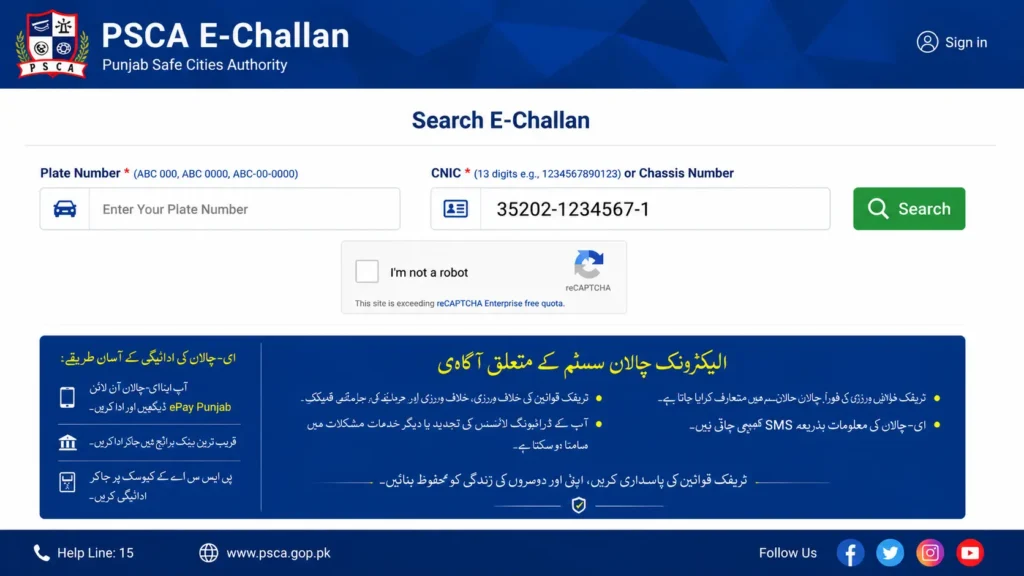
The portal will show you a safe city challan and token tax which is linked to your identity card.
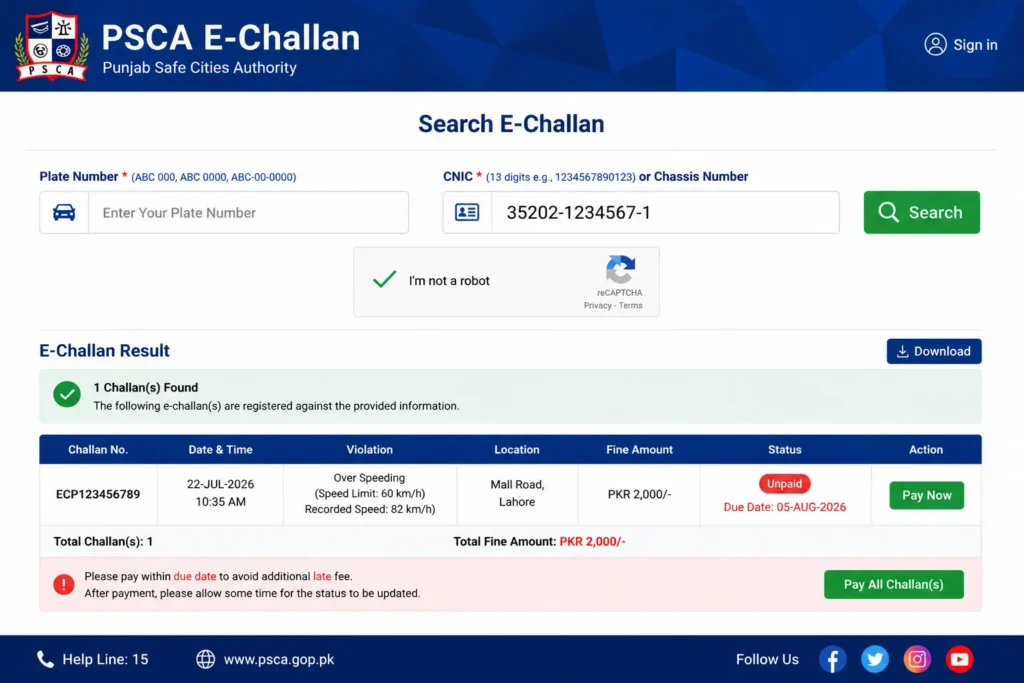
Method 3: psca e Challan check online by challan Number
Use this method if you received an SMS or paper challan.
Step 1: Go to the browser and search for the PSCA e-Challan portal.
Step 2: Now select the Challan Number option
Step 3: Add your challan number and enter any additional information requested.
Step 4: Click the Search button to see details of the e-challan
Step 5: You can view the violation details, payment status, and available evidence.
Method 4: Check e-Challan by Chassis Number
If your registration number is unavailable or your number plates have changed, you can check your challan using the chassis number.
Step 1: Visit the PSCA e-Challan website
Step 2: Select Chassis Number and enter your chassis number
Step 3: Complete the vehicle verification process and click Search.
Step 4: Review any challans linked to your vehicle.
Method 5: Check e-Challan punjab via SMS
If you have no stable internet in your area, you can use the SMS service to check the psca e Challan check online of your car or bike.
Step 1: Pick up your phone and open the Messaging app on it
Step 2: In the message box, type your vehicle registration number.
Step 3: Send this registration number to 8815.
Step 4: Wait for the reply. You’ll receive information about payable e-Challans linked to your vehicle.
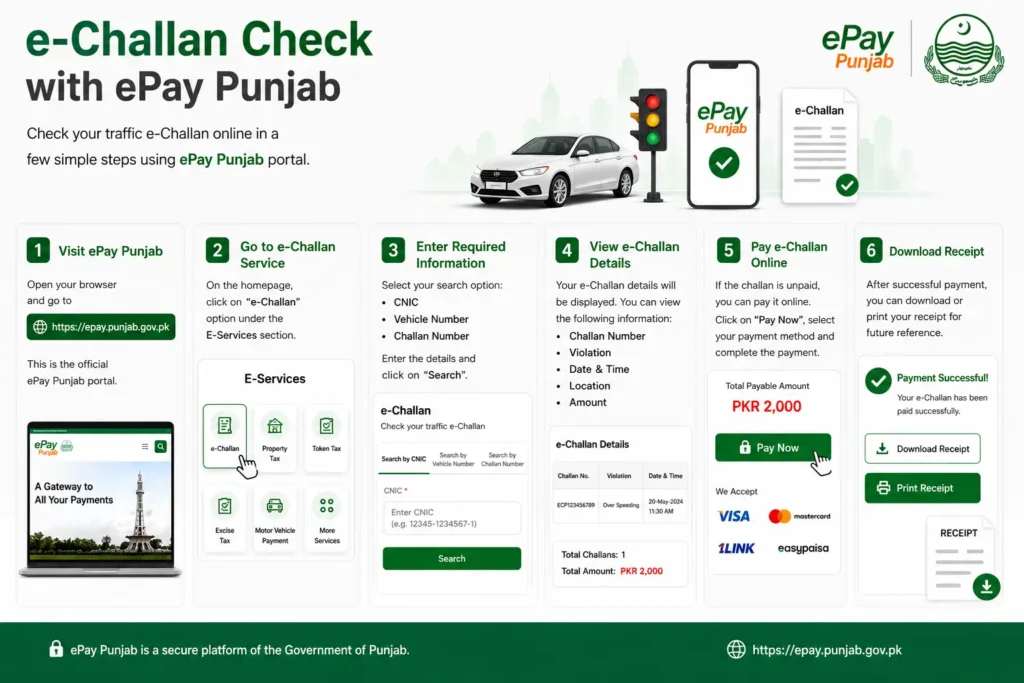
Method 6: Mobile App Method (ePay Punjab)
You can check your psca e-challan through the ePay Punjab application.ePay Punjab is the official online payment system developed by the Government of Punjab that allows citizens to pay government taxes, fees, utility bills, and traffic fines digitally. Through this application, you can check your vehicle challan. But how?
Step 1: First of all, download the ePay Punjab App from the Play Store or App Store.
Step 2: Enter your vehicle registration number.
Step 3: Now you can see if any challan is pending.
How to pay safe city e-challan?
If you received an e-challan, you can pay it through different ways such as
1: Pay psca e-challan through bank
Paying a challan through a bank is an old but most popular way. The majority of people pay a challan through the bank because it is an easily accessible way.
Step 1: Visit any nearest authorised branch of the bank.
Step 2: Show your challan slip to them.
Step 3: Pay in cash and collect receipts for the paid e-challan.
Here is a list of banks where you can pay the e-challan fine
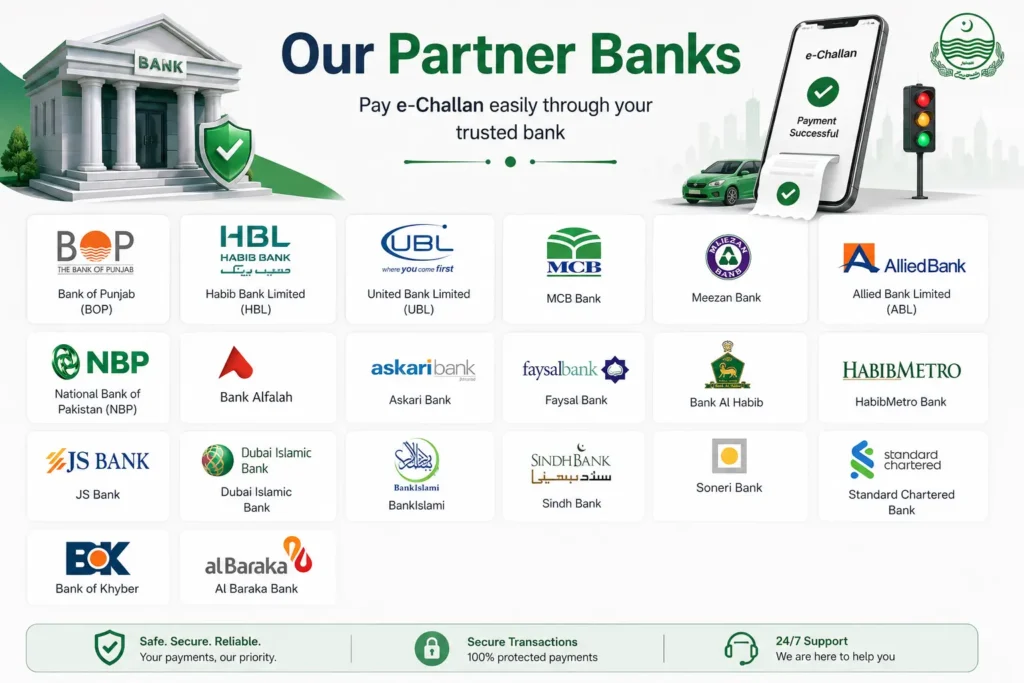
2: Online Method (ePay Punjab)
The easiest and quickest way to pay the challan is using the ePay Punjab application.
Step 1: Download and install the ePay Punjab Application.
Step 2: Open the ePay app and enter challan number/vehicle details.
Step 3: Select a payment method
- Debit or Credit Card
- JazzCash or EasyPaisa
- Online Banking
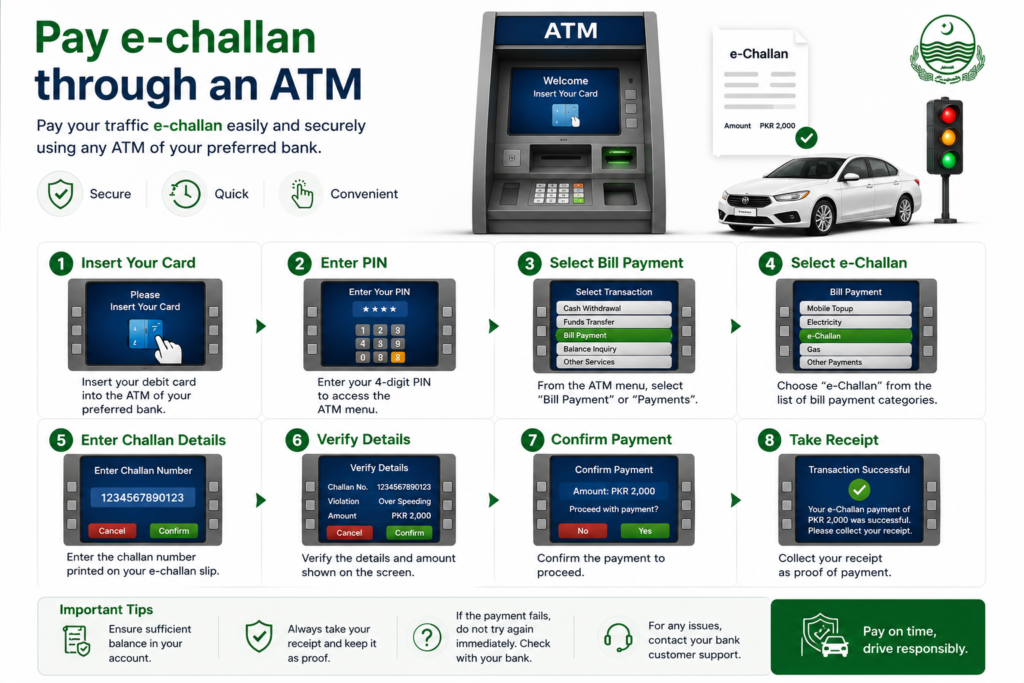
3: Pay e-challan through an ATM
Most major Pakistani banks support ePay Punjab payments through their ATMs. So you can pay through atm.
Step 1: Visit a nearby ATM of any bank.
Step 2: Insert your ATM card into the machine and enter your PIN.
Step 3: Now Select Bill Payments or Government Payments.
Step 4: Next, choose ePay Punjab or PSID Payment and enter your 17-digit PSID.
Step 5: Verify the payment details and confirm the transaction.
Step 6: Collect the printed payment receipt for your records.
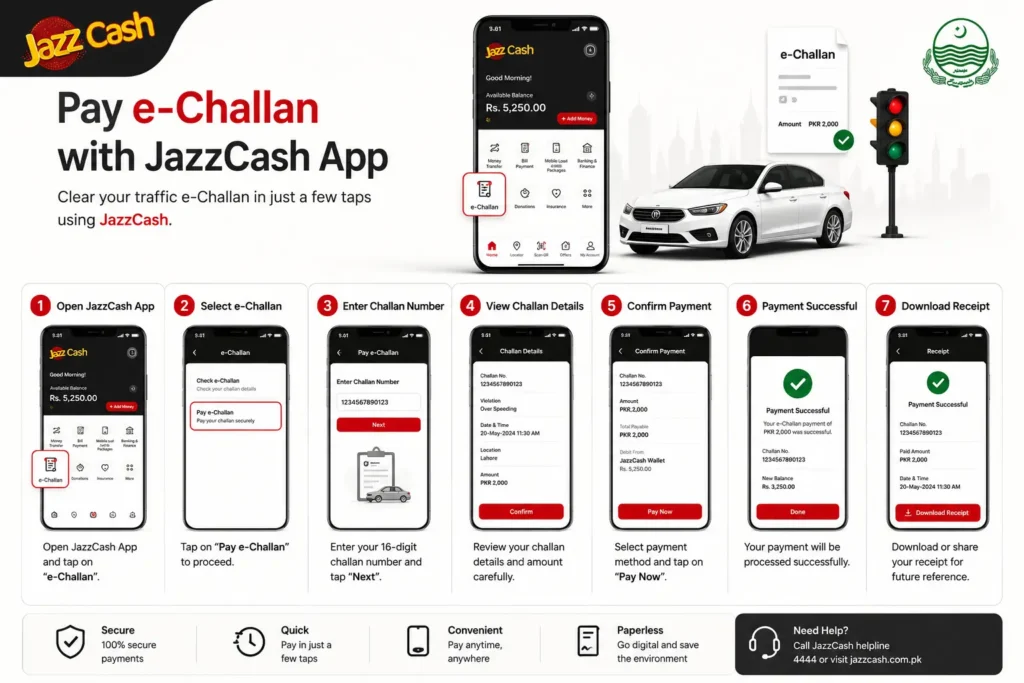
4: Pay Traffic challan Through JazzCash
If you have a JazzCash account, you can pay your vehicle e-challan through it.
Step 1: Log in to your JazzCash account on the official app.
Step 2: Tap on Government Payments or PSID Payments.
Step 3: Add your PSID.
Step 4: Now you can view your challan details and Tap Pay.
Step 5: The psca e-challan online payment will be deducted from your account. Save the transaction receipt.
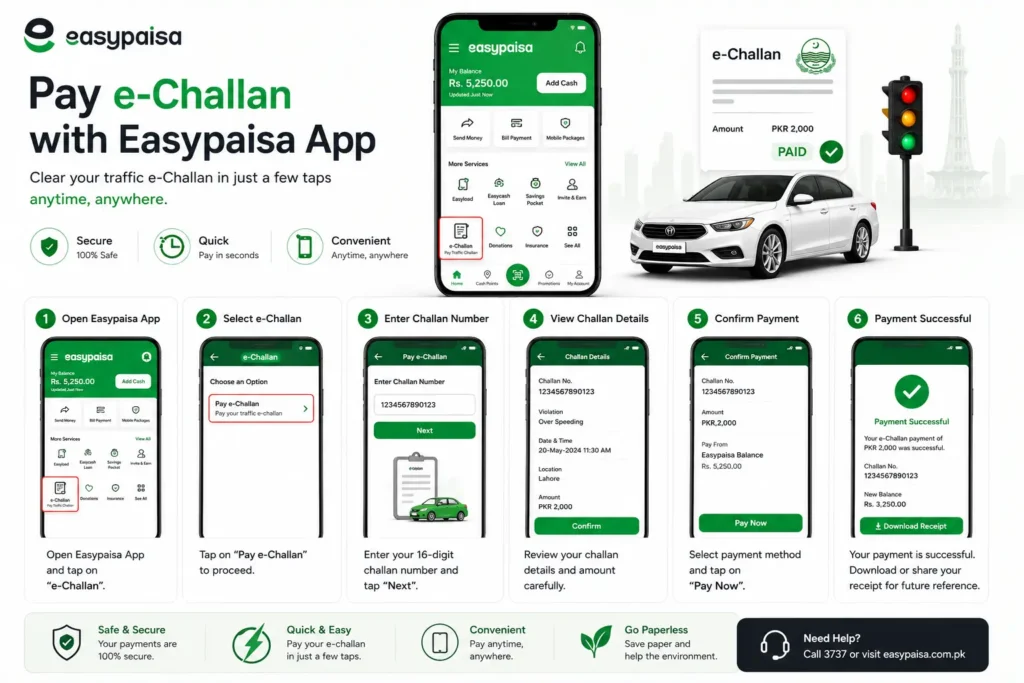
5: Pay E-challan Through EasyPaisa
EasyPaisa also supports e-Challan payments using a PSID. If you are an EasyPaisa account user, you can clear your challan payment through it online.
Step 1: Open your EasyPaisa app on your phone.
Step 2: Select the Government Payments option
Step 3: Enter your PSID.
Step 4: Confirm your payment details and complete the payment.
Step 5: After payment, save the digital receipt.
PSCA e Challan Fine check online(2026 Updated)
| Traffic Violation | Motorcycle | Car (Up to 2000cc) |
| Overspeeding | Rs. 2,000 | Rs. 5,000 |
| Red Light Violation | Rs. 2,000 | Rs. 5,000 |
| Wrong-Way Driving | Rs. 2,000 | Rs. 5,000 |
| Driving Without a License | Rs. 2,000 | Rs. 5,000 |
| Using a Mobile Phone While Driving | Rs. 2,000 | Rs. 5,000 |
| Lane/Line Violation | Rs. 2,000 | Rs. 3,000 |
| Driving Without Lights at Night | Rs. 2,000 | Rs. 3,000 |
| Excessive Smoke Emission | Rs. 2,000 | Rs. 3,000 |
| Illegal Parking | Rs. 2,000 | Rs. 5,000 |
| Driving an Unregistered Vehicle | Rs. 2,000 | Rs. 5,000 |
| Riding Without a Helmet | Rs. 2,000 | N/A |
| Not Wearing a Seat Belt | N/A | Rs. 5,000 |
| Security Number Plate Violation | Rs. 2,000 | Rs. 5,000 |
Why Is It Important to Check Your e-Challan?
There are a lot of reasons why you should check your vehicle challan online, such as
1: Avoid Late Payment
Checking your e-Challan regularly helps you pay the fine before the due date.
2: Verify That the e-Challan Is Genuine.
Scammers send fake e-Challan SMS messages to get money from people. Checking the challan helps you confirm whether the challan is genuine or a scam before making any payment.
3: Review Violation Details
By checking online challan , you can check what violation your car is making, such as violation type, date, time, location, fine amount, etc. This helps you understand why the challan was issued.
4: Dispute an Incorrect e-Challan
When you check your vehicle challan online, you can open a dispute if you believe the challan was issued by mistake or your vehicle was wrongly identified.
5: Keep Your Vehicle Record Clear
Checking e challan on time keeps your vehicle record clear. In this way, you can pay your challan on time.
6: Save Time and Effort
When you check e challan online, it saves your time. You have no need to visit a traffic police office to check your challan.
Common Problems & Solutions
Problem 1: Received an e-Challan SMS but No Challan Appears Online
You received a notification of e challan but the official portal shows no pending challan.
Solution:
Wait a few hours and check again, as the system may take time to update. If the challan still doesn’t appear after 24–48 hours, go to psca e Challan check online portal for assistance.
Problem 2:Unable to Generate a PSID
You cannot generate a Payment Slip ID (PSID) to pay your e-Challan.
Solution
Verify that your challan is active and that the entered details are correct. If the issue remains, contact the PSCA helpline or visit a nearby traffic police office for support.
Problem 3: psca e Challan check online status Still Shows as Unpaid After Payment
You have already paid the fine, but the portal still displays it as unpaid.
Solution:
Payment updates may take some time. Keep your payment receipt and check the status again after 24–48 hours. If it remains unpaid, contact your bank or PSCA with your payment proof.
Problem 4: Wrong e-Challan Issued to Your Vehicle
You receive an e-Challan for a violation you did not commit.
Solution:
Review the challan details and evidence. If the vehicle or violation is incorrect, submit a review request through the official PSCA system or contact the relevant traffic authority.
Problem 5: Received an e-Challan After Selling Your Vehicle
You are still receiving challans of vehicle which you have sold.
Solution:
First of all, make sure the ownership of your vehicle has been transferred. If the vehicle is still registered in your name, go to the excise office and update the ownership immediately.
Problem 6: No Photo or Evidence Available
The challan does not have any violation photo.
Solution:
If your challan has a photo on it, contact the PSCA and request them to cancel this fake challan.
Problem 7: Dispute issue
You believe the challan was issued by mistake but don’t know what to do.
Solution:
Collect the challan details and any supporting evidence, then submit a review request through the official PSCA portal or contact the traffic police for further assistance.
Problem 8: Ignored an e-Challan
You are unsure whether an unpaid e-Challan will cause future problems.
Solution:
Avoid ignoring traffic fines. Pay verified challans on time to keep your vehicle record clear and prevent complications with future vehicle-related matters or traffic enforcement.
FAQs