
Vehicle Smart Card Status Check Online Punjab
Have you applied for a vehicle smart card, but your card has not been received yet? You are not alone. Hundreds of citizens are complaining about vehicle smart card delay issues on different online forums, which is frustrating. But here is good news for you. Recently the government started a vehicle smart card status check online punjab service.
In this article, we will guide you on how you can track your vehicle smart card status.
What is a vehicle smart card?
A Vehicle Smart Card is an official registration card that proves the ownership of a vehicle. Recently, the Punjab Excise and Taxation Department started issuing these modern registration cards to replace the older ones. You can get it after mtmis punjab online vehicle verification .It is basically a plastic card containing a chip with all important identity information and other vehicle information such as
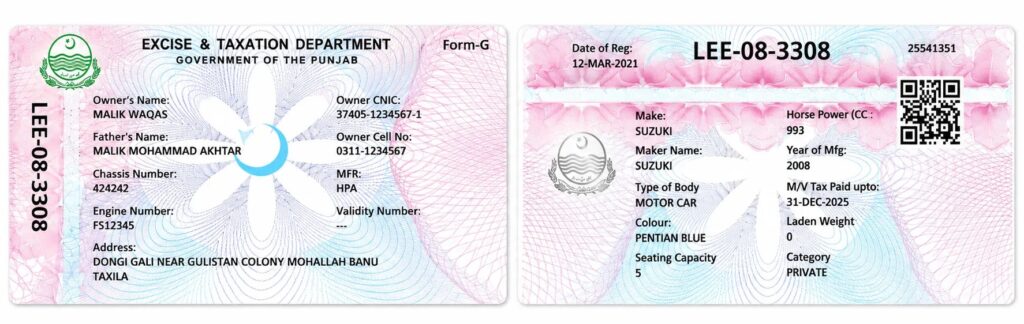
| Mentioned Details | What it shows |
| Registration number | Printed vertically along the edge — the vehicle’s plate number. |
| Owner’s name and father’s name | The registered owner identity, matching their CNIC record. |
| Owner CNIC | The 13-digit national identity number the vehicle is registered against. |
| Owner cell number | The contact number provided at registration. |
| Chassis number | The frame’s unique identifier — the same number you used to download the card. |
| Engine number | The engine’s identifier; match it physically when buying a used vehicle. |
| HPA | Hire-Purchase Agreement. If a bank financed the vehicle, its name appears here; blank means no active lien. |
| Vanity number | Filled only if the owner purchased a personalized plate. |
| Address | The owner’s registered address. |
Understanding vehicle smart card status check online punjab results
| Vehicle smart card punjab Status | Meaning | What to Do |
| Application Received | Your application is in queue | Wait 7-10 days |
| In Process | Under review by Excise department | No action needed |
| Approved | Smart card is being printed | Will be ready soon |
| Printed | Card has been manufactured | Ready for dispatch |
| Dispatched | Sent via Pakistan Post | Track on Pakistan Post website |
| Arrived at GPO | Reached your city’s main post office | Will be delivered soon |
| Out for Delivery | Courier is on the way | Be available at address |
| Delivered | Card received | Keep it safe |
| Rejected | Documents or payment issue | Contact Excise office |
| No Record Found | Application not in system yet | Wait 2-3 days or check details |
Vehicle smart card status check online punjab
Checking vehicle smart card status is easy. You have multiple ways to check your vehicle smart card status, such as
Method 1: Vehicle Smart Card Status Check Online Punjab MTMIS Website
MTMIS Punjab is a government-introduced website for smart card status checking and online punjab vehicle registration. This is the easiest, quickest, and most secure way to know the status of your car or bike smart card.
Just follow the steps mentioned below to check the status online.
Step 1: Open the official vehicle smart card status check online punjab mtmis website in your browser, or click here for quick access.
Step 2: On the website homepage, you will see multiple options in the header; click the Application tracking option.
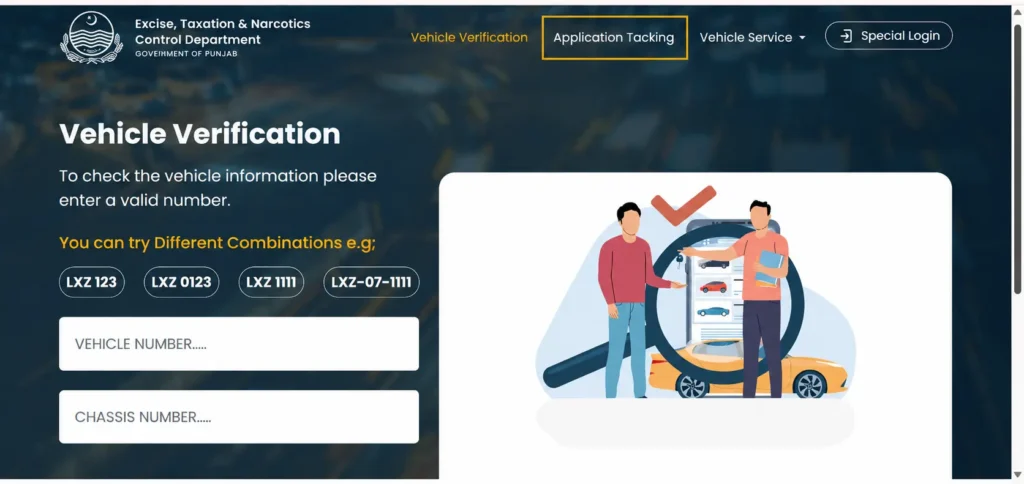
Step 3: Now you will see two boxes: Application number and chassis number. Add details like this.
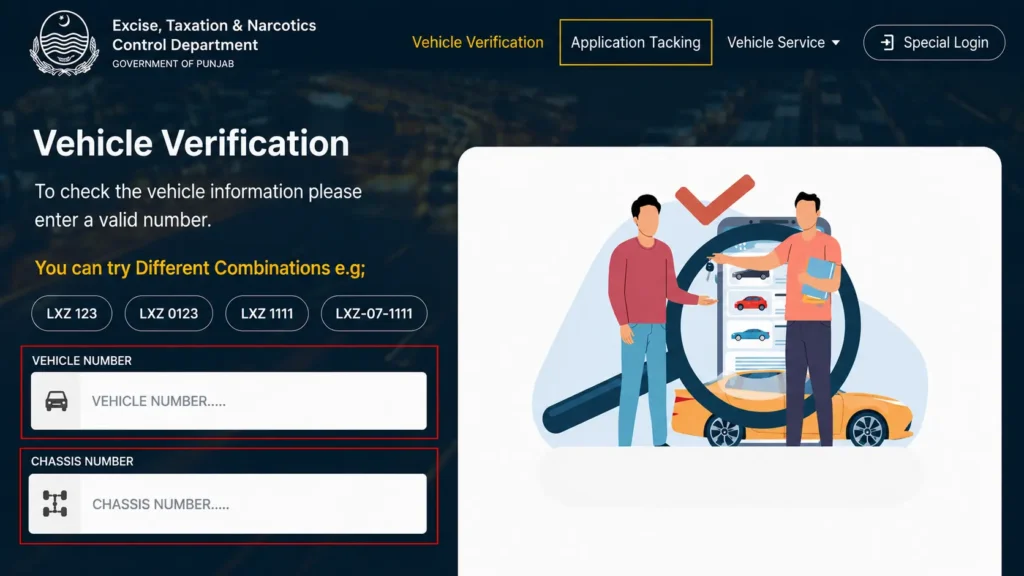
| Field | What to Enter |
| Application or Tracking Number | The number you received after applying |
| OR Vehicle Registration Number | Your number plate (e.g., LEB-20-1234) |
| OR Chassis Number | Last 5-6 digits of chassis number |
Step 4: Fill the CAPTCHA security check to proceed with your application.
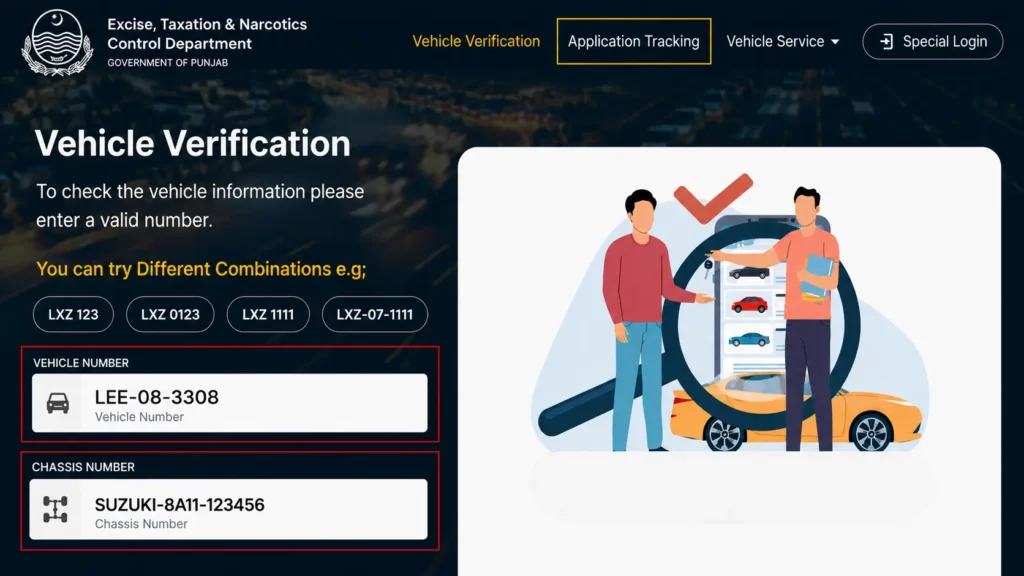
Step 5: Click the “Submit” or “Track” option to see your smart card status
Step 6: View your smart card status instantly.
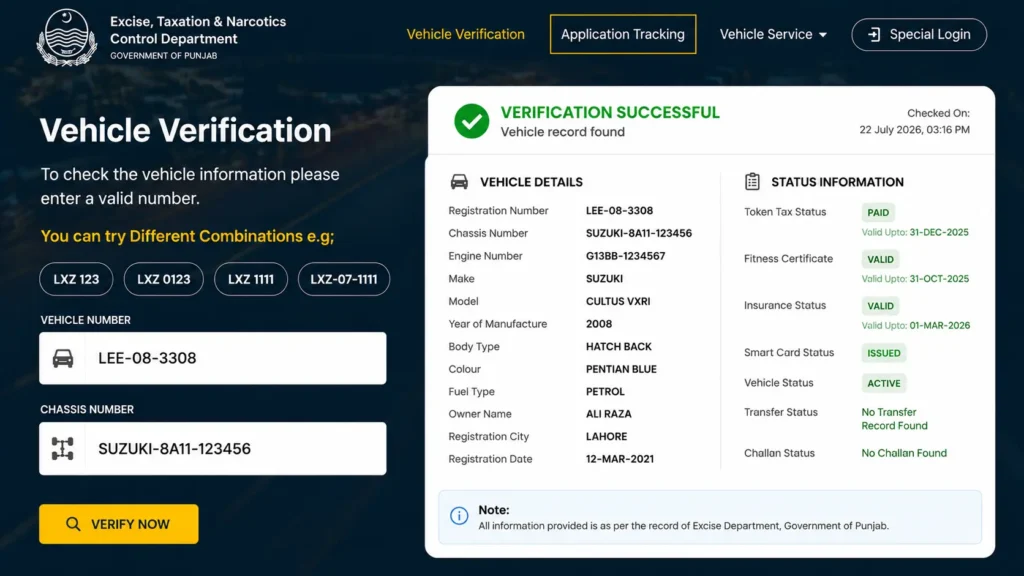
Method 2: Track Smart Card via Pakistan Post (Courier Tracking)
You can check your vehicle smart card punjab status via the Pakistan Post Office tracking service, but only if it is already dispatched. How to track your smart card through Pakistan Post Office.
Step 1: Open the Pakistan Post tracking website on your device or copy this link and paste it into your Google search bar: https://www.pakpost.gov.pk
Step 2: Enter your vehicle registration number in the tracking ID box, which is located on the header right side.
Step 3: After adding the registration number, tap on “Track”
Step 4: Here you can see the delivery status , which could be
- Dispatched from Excise office
- Arrived at local post office
- Out for delivery
- Delivered
If you did not receive vehicle registration yet, use your vehicle number as a tracking ID.
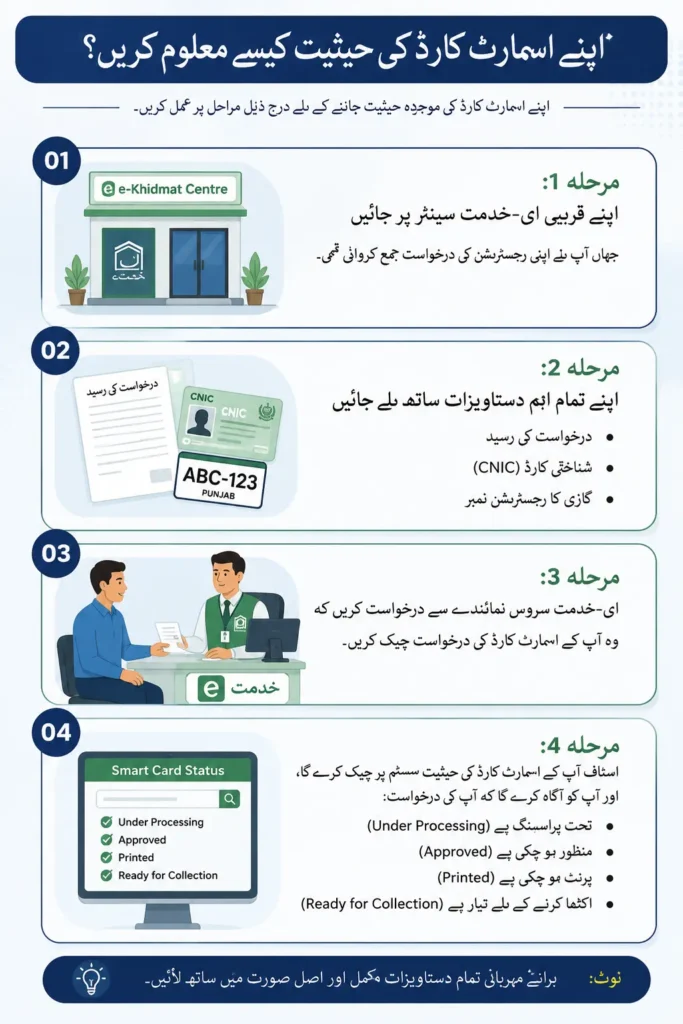
Method 3: Visit an e-Khidmat Centre (Punjab)
If you registered your vehicle through an e-Khidmat Centre in Punjab. You can check your vehicle smart card punjab status there by visiting an e-Khidmat Centre.
Step 1: Go to your nearby e-Khidmat Centre where you submitted your registration application.
Step 2: Bring all your important Documents with you
- Application Receipt
- CNIC
- Vehicle Registration Number
Step 3: Ask the e-khidemat service representative to do your vehicle verification and check your smart card application.
Step 4: The staff will check your smart card status on their system, and they will inform about your application status.
- Under processing
- Approved
- Printed
- Ready for collection
With smart card you can Check and calculate your vehicle token tax online.
Method 4: Visit the Excise Office For Smart Card Vehicle Tracking
If online services are not working for you, then visit the excise office near your location.
Step 1: Find the nearest Excise Office and visit it.
Step 2: Take the Required Documents with you, for example
- Original CNIC
- Registration Receipt
- Vehicle Details
- Application Number
Step 3: Go to the Registration Counter, provide your information, and ask to check the smart card status.
Step 4: The officer will check the system and tell you whether your smart card has been approved, printed, or is ready for collection.
Method 5: Vehicle Smart Card Status Check Online Punjab Excise Helpline
Many Excise departments of Pakistan provide customer support through helpline numbers.
Step 1: Find the Official excise Helpline Number of your province.
Here is a list of excise helpline numbers for different cities
| Province | City/Region | Excise Office | Helpline Number |
| Punjab | Lahore | Excise Department | 0800-08786 |
| Punjab | Lahore | Motor Registration Office | 042-99211400 |
| Punjab | Rawalpindi | Regional Excise Office | 051-9271926 |
| Punjab | Faisalabad | Regional Excise Office | 041-9200023 |
| Punjab | Multan | Regional Excise Office | 061-9200123 |
| Punjab | Gujranwala | Regional Excise Office | 055-9200431 |
| Punjab | Bahawalpur | Regional Excise Office | 062-9250173 |
| Punjab | Sargodha | Regional Excise Office | 048-9230190 |
| Punjab | D.G. Khan | Regional Excise Office | 064-9260186 |
| Punjab | Sahiwal | Regional Excise Office | 040-9200198 |
| Islamabad (ICT) | Islamabad | Excise Office | 051-9265598 |
| Sindh | Karachi | Excise Department | 021-99231410 |
| Khyber Pakhtunkhwa | Peshawar | Excise Headquarters | 091-9212659 |
| Balochistan | Quetta | Excise Department | 081-9201084 |
Step 2: Call During Office Hours and request a smart card status check
Step 3: The representative will ask you for information like
- Registration Number
- CNIC
- Application Number
Step 4: After verifying your information, the representative will update you on your smart card’s current status.
Method 5: Vehicle smart card status check Via SMS
Some provinces offer SMS-based services for vehicle smart card status check.
| Province / Territory | Cities Covered | SMS Number | How to Use |
| Punjab | Lahore, Rawalpindi, Faisalabad, Multan, Gujranwala, Sialkot, Bahawalpur, Sargodha, Sahiwal, D.G. Khan (all Punjab-registered vehicles) | 8785 | Send your vehicle registration number via SMS. |
| Sindh | Karachi, Hyderabad, Sukkur, Larkana, Mirpurkhas, Nawabshah (all Sindh-registered vehicles) | 8147 | Send your vehicle registration number via SMS. |
| Khyber Pakhtunkhwa (KP) | Peshawar, Abbottabad, Mardan, Swat, Kohat, D.I. Khan (all KP-registered vehicles) | 9818 | Send your vehicle registration number via SMS. |
| Islamabad Capital Territory (ICT) | Islamabad | 8521 | Send your vehicle registration number in the prescribed format. |
| Balochistan | Quetta and other districts | Not Available | Use the Excise portal or visit the Excise office. |
Step 1: Open Your Messaging App on your phone and create a new SMS on your mobile phone.
Step 2: Write your car registration number
Step 3: Send the message to the official Excise SMS number of your province.
Step 4: You will receive an SMS with the available vehicle smart card status.
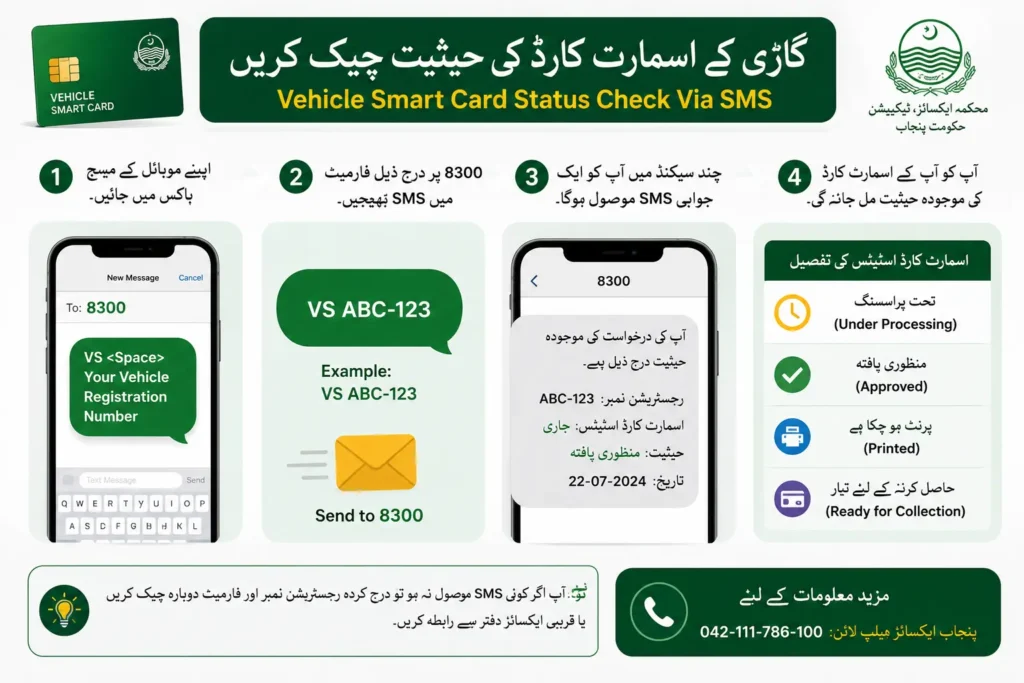
Note: Through this process you can also check your car e challan
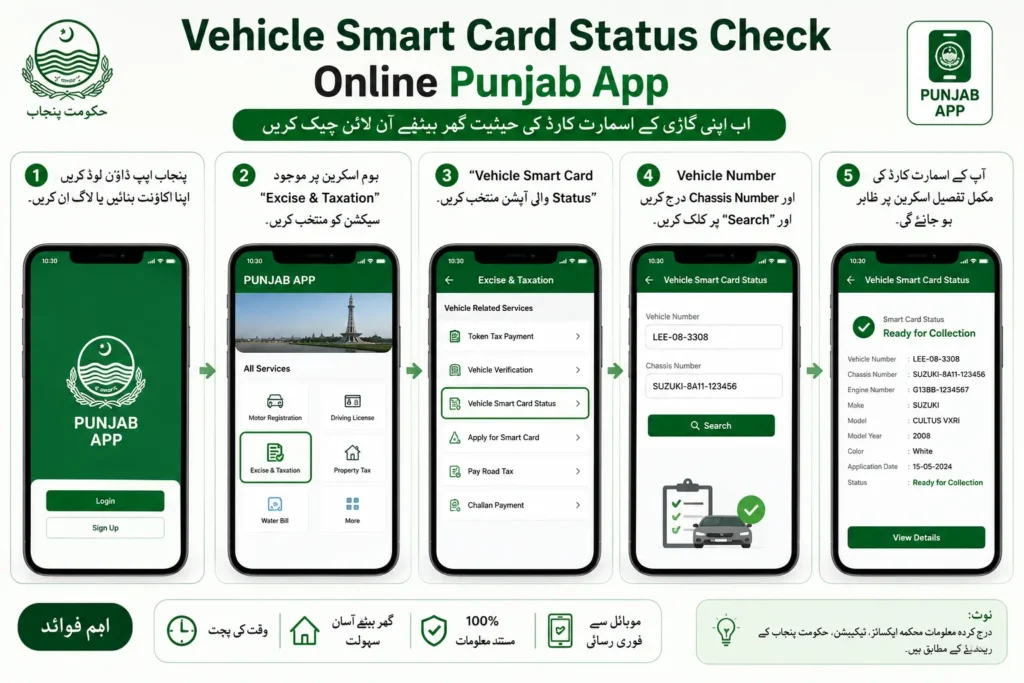
6. Vehicle Smart Card Status Check Online Punjab App
Some provincial Excise departments provide official mobile applications for smart card vehicle tracking.
Step 1: Download and Install the official Excise app for your province from the Google Play Store or Apple App Store.
Step 2: After installation, open the app and go to the Vehicle Services, Vehicle Registration, or Smart Card section.
Step 3: Enter your vehicle registration number and application number
Step 4: Tap Search or Check Status app will show you the status of the smart card.
Why Is a Vehicle Smart Card Important?
Nowadays, it’s important to have a vehicle smart card punjab for your vehicle due to various reasons such as
1. Proof of Legal Registration
Vehicle smart cards serve as strong proof that your vehicle is registered under the excise and taxation department of Pakistan. With a smart card, you can drive your car or bike on the roads of Pakistan.
2. Secure Against Fraud
Smart registration cards of your vehicle include advanced security features such as an embedded chip and QR code. Now it is hard for scammers to make a duplicate card like this to scam people. So if they try to do this, people can verify registration details like the owner’s name, etc with the QR code.
3. Easy Verification
Smart vehicle registration cards make the verification process easy. Now, traffic police and Excise authorities can quickly verify your vehicle’s registration details at traffic stops and check posts.
4. Durable and Long-Lasting
vehicle smart card punjab are durable. You can carry it without fear of tearing, fading, or damage from water. You can keep it in your wallet easily.
5. Required for Ownership Transfer
The smart card is an important document when you sell, purchase , or transfer ownership of a vehicle. This smart card makes the vehicle transfer process smooth.
6. Helpful for Insurance and Other Services
Insurance companies, banks, and other institutions require the vehicle smart card when you request insurance claims, financing, or other vehicle-related services.
7. Convenient to Carry
It is easy to carry due to its wallet-sized smart design.
8. Supports Digital Record Management
The smart card is linked to the Excise Department’s digital database. It allows the authorities to access accurate and up-to-date registration information efficiently.
Vehicle smart card punjab Fees (2026)
Here are the updated fee details for getting your vehicle smart card. But vehicle smart card status check online punjab is free.
| Vehicle Type | Fee |
| Motorcycle | PKR 500 – 800 |
| Car (up to 1000cc) | PKR 800 – 1,000 |
| Car (1000cc – 1800cc) | PKR 1,000 – 1,200 |
| Car (1800cc+) | PKR 1,200 – 1,500 |
| Commercial Vehicle | PKR 1,500 – 2,000 |
| Duplicate Smart Card (lost/damaged) | PKR 500 – 1,000 |
How Long Does Vehicle Smart Card Punjab Delivery Take?
It totally depends on the platform you applied for, the vehicle smart card , and the province where you applied. Usually it takes 7 to 21 working days. But if you are still confused, keep checking vehicle smart card status check online punjab website.
| Stage | Estimated Time |
| Application submission | Same day |
| Document verification | 3-5 working days |
| Smart card printing | 5-7 working days |
| Dispatch via Pakistan Post | 2-3 working days |
| Delivery to your address | 3-7 working days |
| Total | 15-25 working days |
Download Your E-Smart Card (Digital Version)
If you have not received your smart card, you can download a digital smart card or e-registration card. An e-registration card is a digital form of your vehicle registration card that has the same information as a physical smart card.
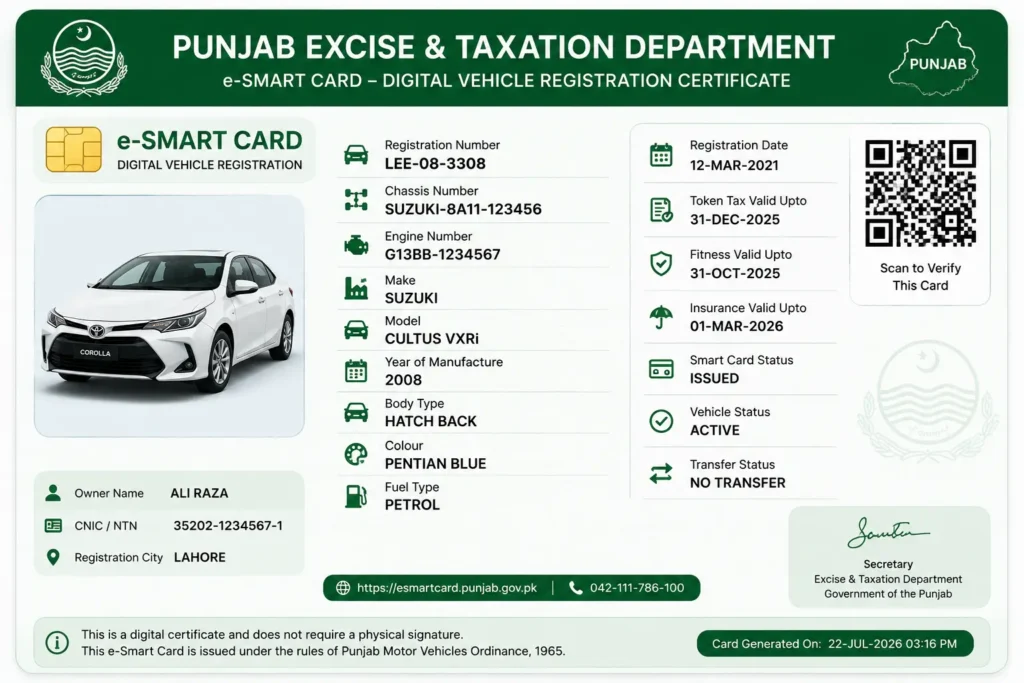
How to Download an E-Smart Card?
Follow these easy steps and get your digital card on your mobile.
Step 1: Visit the MTMIS website and tap on the services option
Step 2: After that, click on the e-registration card, and you will be redirected to the e-registration card page.
Step 3: Here, enter your Vehicle registration number and Chassis number
Step 4: It will show you your digital card; now tap on the Download option
Step 5: After downloading to your device, you can print your official e-smart card
Important Note: The e-smart card is 100% legal and acceptable everywhere in Pakistan. If authorities ask you about a smart card in any situation, you can show it on your phone or keep a printed copy.
Common vehicle smart card status check online punjab Issues & Solution
People discussed various smart card-related issues on different forums to get help. Here are solutions for all those issues.
Issue 1: Smart Card Shows “Dispatched” but Is Not Delivered
Many people said their status showed “Printed” or “Dispatched”, but they did not receive the card for weeks. The cause of this is that they reached the post office but could not be delivered due to various reasons.
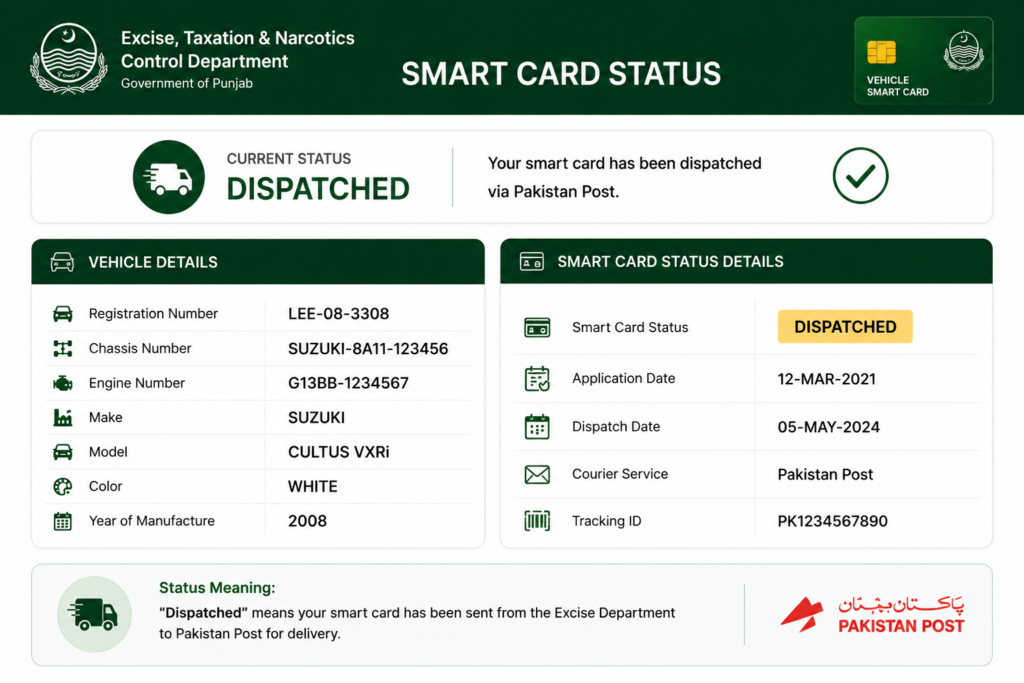
Solution
- Track your card on the Pakistan Post tracking system with your registration number.
- Visit your nearest Pakistan Post Office if the card shows as dispatched.
- If there is no update for several weeks, contact your local Excise office.
Issue 2: Pakistan Post Shows “No Record Found”
Several users complained that the Pakistan Post office website is showing No Record Found of vehicle smart card punjab
It means the excise department has not yet handed the card over to Pakistan Post, or there is an issue with the application.
Solution:
- Visit vehicle smart card status check online punjab
- Verify that you have added the right registration number in the correct format.
- Wait a few days and check again.
- Contact the exercise helpline.
Issue 3: No SMS Notification Received
Many applicants never received an SMS about dispatch. It could be that you have added the wrong number or changed your number.
Solution
- Go to vehicle smart card status check online punjab website
- Use your vehicle registration number to track the delivery through Pakistan Post.
Issue 4: Smart Card Delayed for 2–4 Months
Users reported they are waiting for two to four months after registration or ownership transfers.
Solution:
- Confirm that the ownership transfer or registration has been completed.
- Check vehicle smart card status online Punjab regularly.
- Contact the Excise office if the delay becomes excessive.
Issue 5: Card Marked as Delivered but Never Received
Some applicants found that the tracking system marked the card as delivered, but they did not get it.
Solution:
- Visit your nearest Pakistan Post Office immediately.
- Ask staff to search using your registration number or article tracking number.
- If the card has been returned to the Excise Department, contact the issuing Excise office for further instructions.
Issue 6: Lost Vehicle Smart Card
Users who lost their smart cards asked how to obtain a replacement and whether they needed to visit the Excise office in person.
Solution:
- Report the loss to the Excise Department.
- File an FIR if required by your province.
- Apply for a duplicate smart card.
- Pay the applicable duplicate card fee.
- Track the replacement card after your application is processed.
Issue 7: Wrong details on smart card
Many users received their smart card but with wrong details, which is hectic.
Solution:
Visit the excise office of your city and submit your application for correction.