How to Transfer Car Ownership in Punjab Pakistan (2026)
If you have purchased a used car or sold your vehicle in Punjab, Pakistan, transferring ownership is an essential step to ensure that the official Excise and Taxation Department record reflects the new owner. Completing the transfer helps protect both the buyer and seller and reduces future problems involving vehicle taxes, fines, and registration documents.
Punjab offers a digital vehicle transfer process through ePay Punjab. The official system allows applicants to initiate a transfer, enter buyer information, and generate a payment reference for the applicable transfer fee. Biometric or identity verification requirements must also be completed according to the current procedure.
This guide explains how to transfer car ownership in Punjab, what documents you may need, how to pay the transfer fee, and how to check the updated registration record.
1. What Is Car Ownership Transfer?
Car ownership transfer is the official process of changing a vehicle’s registered owner from the seller to the buyer in the Excise Department’s records.
For example, if you purchase a used Suzuki Alto, Honda City, Toyota Corolla, or another vehicle registered in Punjab, you should complete the official ownership transfer rather than relying only on a sale agreement or payment receipt.
The transfer process establishes the buyer as the recorded owner after the required formalities have been completed.

2. Documents Required for Car Ownership Transfer
Before beginning the transfer process, prepare the relevant documents and information.
-
Original vehicle registration certificate or smart card.
-
Original CNIC details of the buyer and seller.
-
Vehicle registration number.
-
Vehicle chassis number and other requested vehicle details.
-
Sale agreement or transfer deed, where required.
-
Transfer application or prescribed forms, if applicable.
-
Original registration file, if applicable to the vehicle.
-
Proof of payment of applicable token tax and transfer charges.
-
Biometric or identity verification required by the current system.
The official e-Khidmat Markaz vehicle-transfer service lists documents including a transfer deed, T.O. form, original registration certificate with updated token tax payment, and original registration file where applicable. Requirements may differ depending on the route used and the vehicle’s circumstances.
Tip: Check that the seller’s name and vehicle details match the official registration record before paying the full purchase price.

3. Step-by-Step Process to Transfer Car Ownership
Step 1: Open the Official ePay Punjab Portal
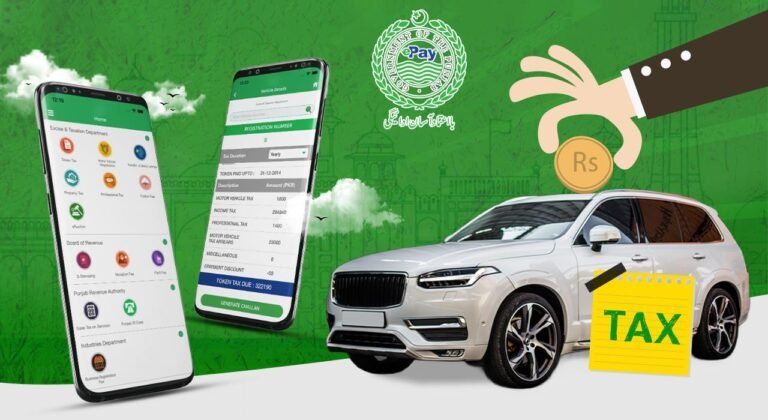
Visit the ePay Punjab website or use its official mobile application.
Choose the Excise and Taxation Department service for Transfer of Ownership for Motor Vehicle. This is the service identified in the department’s published transfer procedure.
Step 2: Enter the Vehicle Registration Number
Enter the car’s registration number in the requested field. The system may retrieve information such as:
-
Vehicle registration number
-
Manufacturer and make
-
Chassis number
-
Current registered owner’s name
-
Vehicle token tax status
Review the details carefully. If the information does not match the vehicle or seller, stop and resolve the discrepancy before proceeding

Step 3: Enter the Buyer’s Information
If the vehicle details are correct, proceed to the buyer information form. Depending on the application, you may need to provide:
-
Buyer’s CNIC number
-
Full name and father’s name
-
Address and city
-
Mobile number
-
Individual or organisation ownership type
-
Transaction district
Enter the buyer’s details accurately because errors can delay the transfer.

Step 4: Generate the Transfer Fee PSID
Follow the prompts to generate the transfer payment challan. The official ePay Punjab service issues a unique 17-digit Payment System Identifier (PSID) for eligible payments.
Review the fee and any outstanding dues displayed before paying.
Step 5: Pay the Transfer Fee
Pay using a supported channel listed by ePay Punjab, such as mobile banking, internet banking, an ATM, a participating wallet, or an authorised over-the-counter channel. Save the payment receipt.
Step 6: Complete Biometric or Identity Verification
Complete the seller’s and buyer’s required identity verification using the method currently authorised by Punjab Excise.

The department has published information on biometric verification and announced a move towards verification through the NADRA Pak Identity app. Because procedures can change, check the official Excise biometric verification page for the current instructions before beginning this step.
Step 7: Complete the Transfer and Check the New Record
Follow any remaining instructions from the Excise Department. If an in-person visit or document submission is required for your particular case, take the requested original documents.
After processing, use the official MTMIS Punjab vehicle verification portal to check whether the registration record reflects the new owner.
Do not consider the transfer complete simply because you have paid the fee or signed the sale agreement. Confirm that the official record has been updated.
4. How Much Does Car Ownership Transfer Cost in Punjab?
The total cost depends on the applicable transfer fee and any additional amounts due for the particular vehicle or transaction. Outstanding token tax, penalties, or other applicable charges may affect the total.
To check the current amount:
-
Open ePay Punjab.
-
Select the motor vehicle ownership transfer service.
-
Enter the requested vehicle details.
-
Review the generated payment information.
-
Check the official Excise tax and fee information if anything is unclear.
Avoid relying on an old fee chart or a fixed amount advertised online. Confirm the amount displayed by the official system before paying.
5. Can You Transfer Car Ownership Online in Punjab?
Punjab supports digital vehicle-transfer services through ePay Punjab. However, the exact steps and identity-verification requirements can depend on the current system and your vehicle’s circumstances.
Some cases may require additional documentation or assistance from an Excise office or authorised service centre. Start with the official Punjab Excise website to find the current service instructions.
6. Common Problems During Car Ownership Transfer
| Problem | What to do |
|---|---|
| Vehicle details do not match | Check the registration number and official record before proceeding. |
| Token tax is outstanding | Check the amount due and settle any applicable dues as instructed. |
| Transfer PSID payment fails | Check your bank transaction and PSID status before paying again. |
| Biometric verification fails | Follow the official verification troubleshooting instructions or contact the relevant authority. |
| Seller is unavailable | Ask the Excise Department about the authorised process for your particular circumstances. |
| Ownership record is not updated | Keep your receipts and application details and contact the relevant Excise office. |
7. Important Tips for Buyers and Sellers
-
Verify the car’s registration details before purchasing it.
-
Check that the chassis number and other identifying details match the documents.
-
Confirm the seller is the registered owner or is legally authorised to complete the transaction.
-
Check for outstanding taxes or other issues before finalising the purchase.
-
Keep copies of the sale agreement, payment receipt, and transfer application.
-
Complete the official ownership transfer promptly rather than relying on an informal agreement.
Frequently Asked Questions
1. How can I transfer car ownership in Punjab Pakistan?
Start through the official ePay Punjab vehicle-transfer service, enter the vehicle and buyer details, pay the applicable fee, complete the required identity verification, and follow the remaining Excise instructions.
2. Can I transfer car ownership without visiting an Excise office?
Some steps can be completed online, but additional attendance or document submission may be necessary depending on the case and the current procedure. Check the official instructions first.
3. Is biometric verification required for car transfer?
Identity verification is part of Punjab’s vehicle-transfer procedures. Follow the current instructions provided by Punjab Excise for the seller and buyer.
4. What happens if the seller does not complete verification?
The transfer may remain incomplete. Contact the relevant Excise office to learn what options are available for your specific circumstances.
5. How can I check whether the car has been transferred to my name?
Visit the official MTMIS Punjab portal and check the available registration record after the transfer has been processed.
6. Where can I find official vehicle-transfer information?
Visit Punjab Excise and Taxation or ePay Punjab for official service instructions, payment information, and transfer-related guidance.
Conclusion
Transferring car ownership in Punjab Pakistan involves checking the vehicle’s registration record, entering the buyer’s information, paying the applicable transfer fee, completing the required verification, and confirming that the official record has been updated.
For more vehicle registration and verification guides, visit MTMIS Punjab
Suggested internal links for MTMIS Punjab: